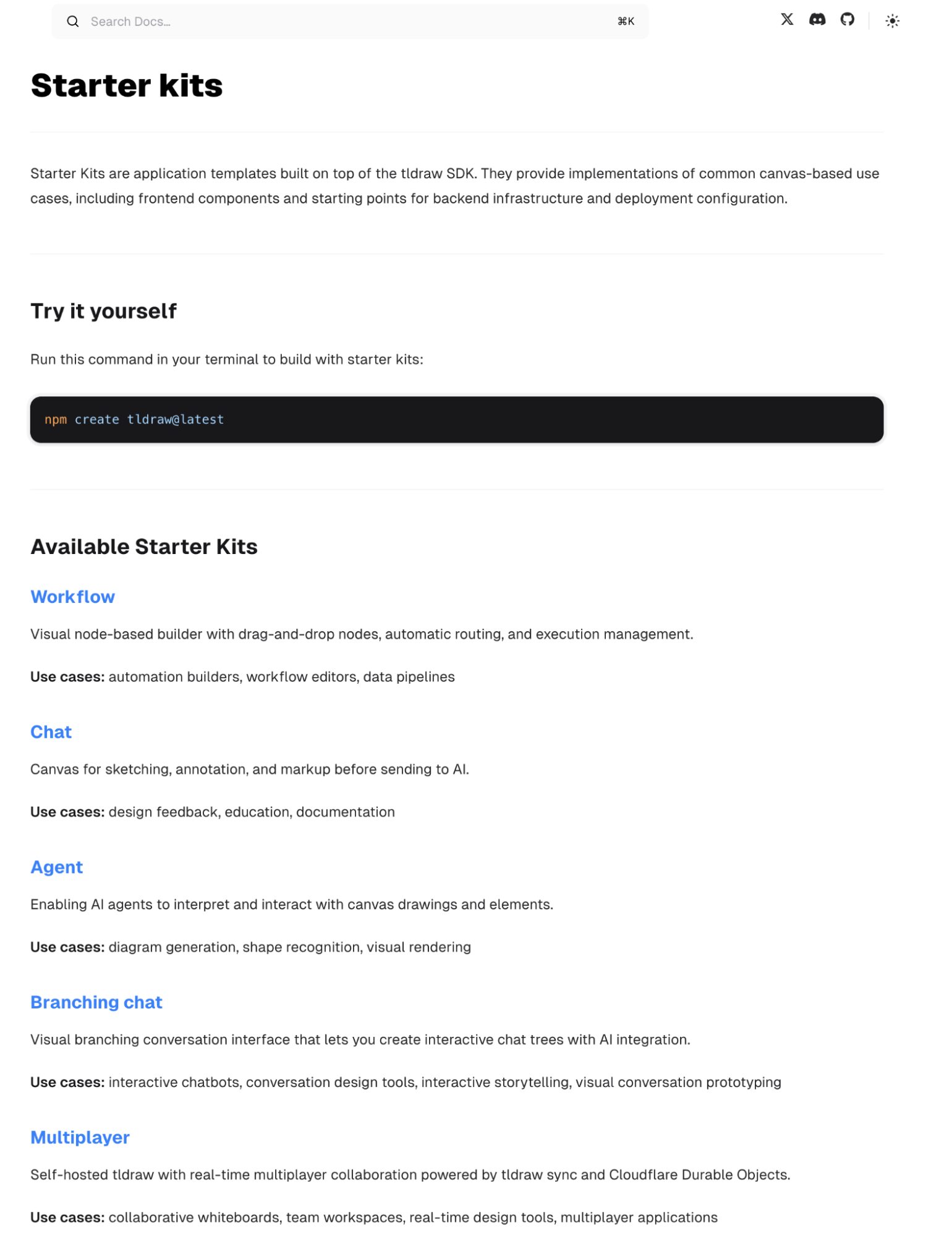
As teased yesterday, tldraw has released its major update. tldraw didn't keep everyone waiting and has released a complete set of AI-based solutions.
On their official website, tldraw calls these "Starter kits," including workflow, chat, agent, branching chat, and multiplayer.
Corresponding to five projects on GitHub, I have gathered them together under the collective name "flow." The goal is to integrate them into my current various projects.
Nine months have passed since the release of tldraw compute alongside Gemini 2.0. As mentioned in yesterday's "teaser," nine months feels like a lifetime ago in the AI world.
The best AI applications powered by Gemini 2.0 have arrived, and they are completely free.
I have always believed that this solution contains the ultimate form of AI super-assistants before they transcend "display interaction." Now, tldraw has finally updated, with more detailed classification and interaction optimization. Of course, the integration work is up to the user.
I had codex perform a complete project analysis, which is provided at the end of this report.
I will first show one case study; a screen recording might best explain why I believe the ultimate key is hidden here.
Below is the project analysis generated by codex with a single click: from content to all architecture diagrams, ultimately outputting a docx document (the template panorama above belongs to it). It was just a single prompt. Claude Code is officially retired.
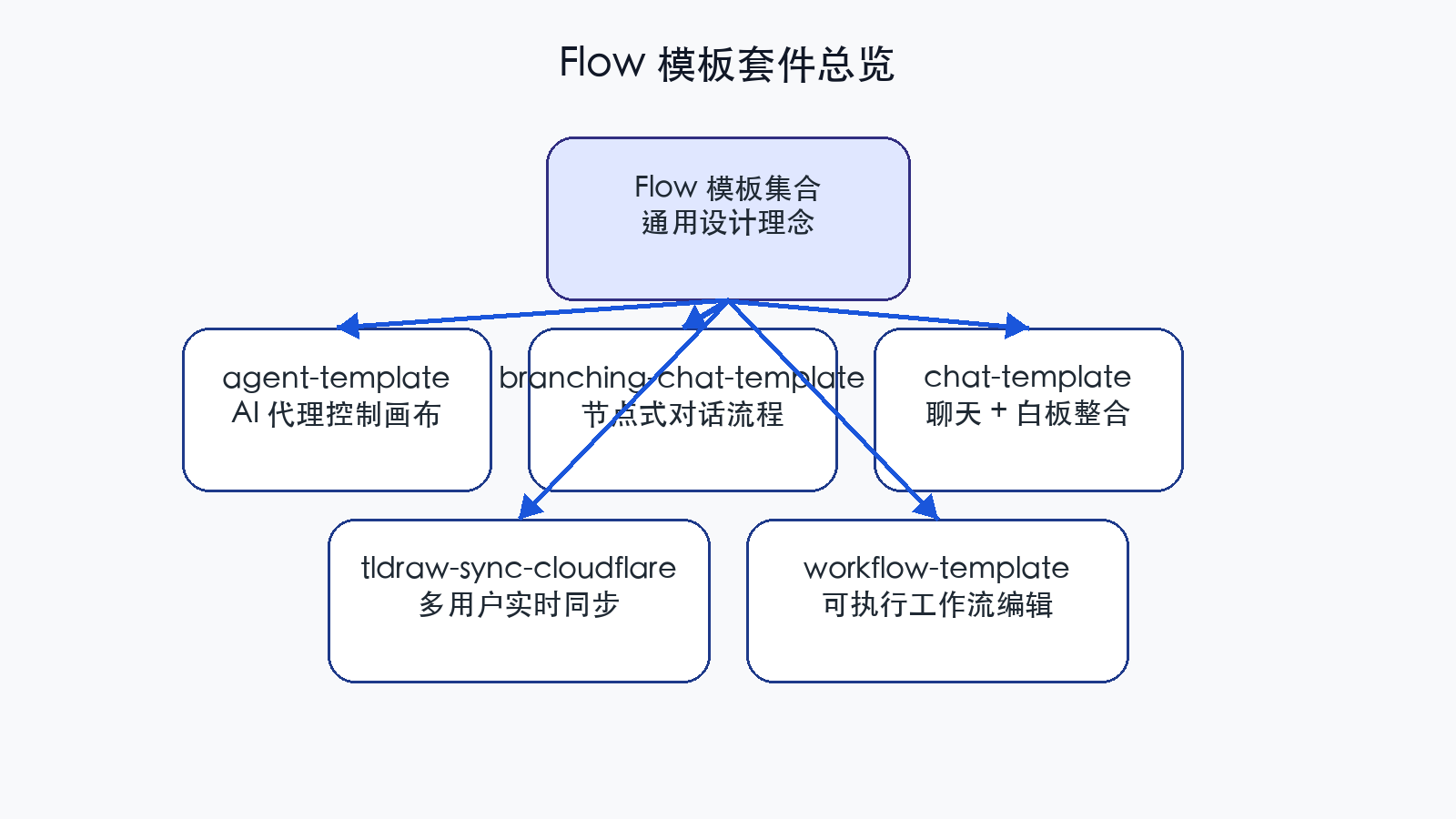
Flow Template Panorama
1. Project Suite Overview
Positioning: The flow root directory contains 5 frontend/full-stack templates centered on the tldraw ecosystem, covering AI whiteboard agents, visual dialogue, sync services, whiteboard-enhanced chat, and workflow orchestration.
Common Features: All use the React ecosystem, emphasizing tldraw's custom shapes, toolchains, and integrations with Cloudflare Workers and Vercel AI SDK.
Differentiation: Range from lightweight frontend templates (workflow-template) to heavy real-time systems with Durable Objects and R2 persistence (tldraw-sync-cloudflare), providing clear levels of complexity for selection.
Directory Structure: Each template independently maintains dependencies and build configurations. Architectural diagrams are under docs/diagrams, reproducible via scripts/generate_diagrams.py.
2. agent-template —— AI Agent Driven Canvas Automation
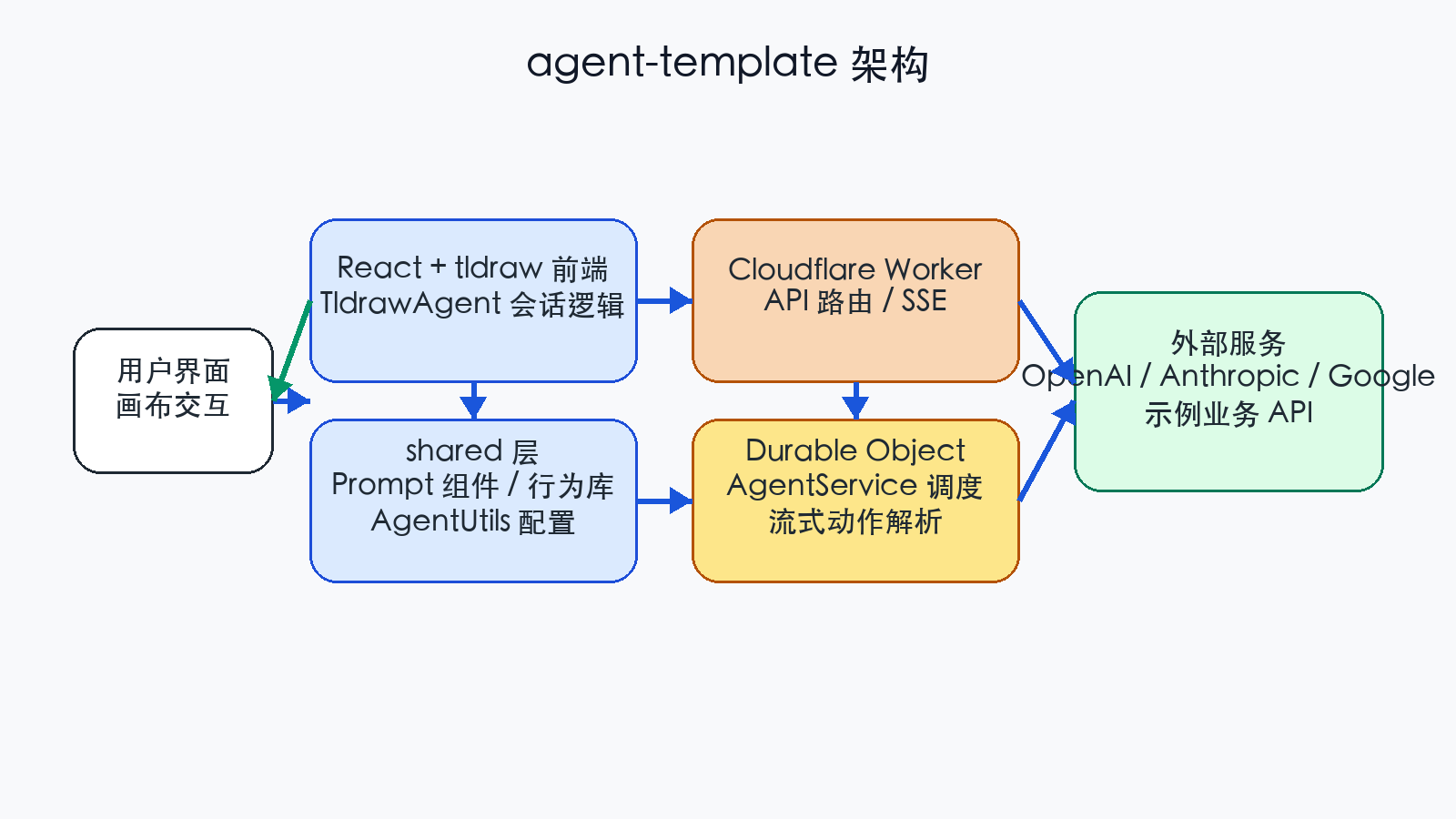
agent-template Architecture
2.1 Project Overview
Goal: Build an AI Agent capable of understanding canvas context, planning operations, and executing tasks. Users drive the agent to manipulate the tldraw canvas through a chat panel.
Tech Stack: Vite + React + tldraw (Frontend), Cloudflare Worker + Durable Object (Backend), AI integration via OpenAI / Anthropic / Google.
Core Philosophy: Frontend handles interaction and state sync; capabilities are split into "what it can see" and "what it can do," configured via a shared directory for easy extension or trimming.
2.2 Key Code Structure
- client/App.tsx: Assembles
, initializes the agent, registers tools, and customizes the UI. - client/agent/TldrawAgent.ts: Encapsulates agent lifecycle and message loops, providing prompt/cancel/reset interfaces.
- shared/AgentUtils.ts: Aggregates PROMPT_PART_UTILS and AGENT_ACTION_UTILS; the core entry for extending vision/actions.
- shared/parts/*: Model-oriented context builders (e.g., ScreenshotPartUtil, TodoListPartUtil).
- shared/actions/*: Specific action implementations (e.g., PenActionUtil for drawing, StackActionUtil for batch layout).
- worker/worker.ts: Exposes /stream SSE interface using itty-router.
- worker/do/AgentDurableObject.ts: Handles model interaction and maintains consistent session state for a user.
- worker/do/AgentService.ts: Wraps Vercel AI SDK's streamText, abstracting multi-model configs and event streams.
2.3 Workflow
- User triggers a chat or action; TldrawAgent constructs an AgentPrompt based on the current canvas state.
- Prompt is POSTed to Cloudflare Worker via /stream, which forwards it to the Durable Object.
- Durable Object calls AgentService.stream, assembling context via buildSystemPrompt and buildMessages.
- streamText returns JSON fragments; closeAndParseJson attempts completion to form a streaming AgentAction.
- Action events return to the frontend via SSE, where TldrawAgent executes them (create/move/batch operations, etc.).
2.4 Development & Extension Suggestions
- New Perception: Create a util in shared/parts and register it in PROMPT_PART_UTILS.
- New Actions: Define a Zod schema and implement an AgentActionUtil subclass in AGENT_ACTION_UTILS.
- Model Adjustment: Declare new model IDs in worker/models.ts and update wrangler.toml with API keys.
- External APIs: Refer to CountryInfoActionUtil for business integrations.
2.5 Operational Notes
- SSE connections require Cache-Control: no-transform to prevent proxy caching.
- Durable Objects aggregate by name (e.g., "anonymous"); rooms can be split by user identity.
- LLM calls should limit return tokens (default 8192) and configure thinkingBudget for Gemini.
3. branching-chat-template —— Visual Branching Dialogue Workbench
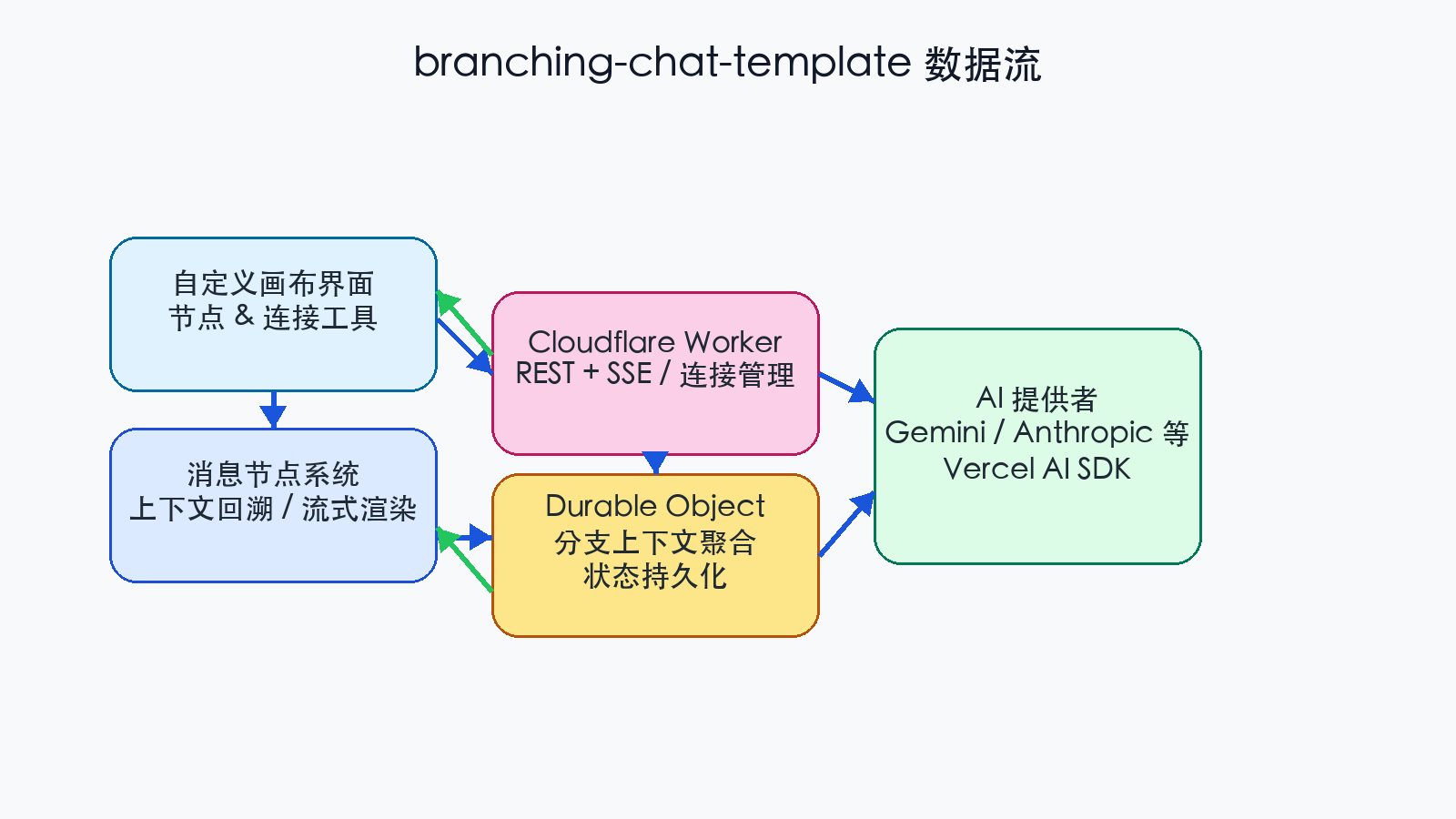
branching-chat-template Data Flow
3.1 Project Overview
Positioning: Build "dialogue nodes" and "connection lines" on an infinite canvas to form a visual branching conversation tree, ideal for chatbot design and interactive fiction.
Tech Stack: tldraw custom shapes/bindings/toolbar (Frontend); Cloudflare Worker + Durable Object (Backend); AI via Vercel AI SDK (Default: Google Gemini).
Highlights:
- Custom MessageNode rendering with streaming response support.
- Connection system using ConnectionShapeUtil + ConnectionBindingUtil for layer and lifecycle management.
- PointingPort extends the select tool for drag-to-connect functionality.
3.2 Core Modules
- client/App.tsx: Injects custom toolbar and registers shapes/bindings.
- client/nodes/types/MessageNode.tsx: Defines node structure, AI callbacks, and dynamic height calculation.
- client/ports/PointingPort.tsx: Registers port interactions to the tldraw state machine.
- worker/do.ts: Durable Object manages branch context and streams AI responses.
3.3 Dialogue & Inference Flow
- User adds/connects nodes; each node holds message text and an AI reply area.
- When sending a message, the frontend traces back the connection path to synthesize a full history.
- Durable Object calls Vercel AI SDK and pushes chunks back to the frontend.
- Frontend fills node content via streaming; nodes can further evolve into multiple branches.
4. chat-template —— Chat + Whiteboard Collaboration
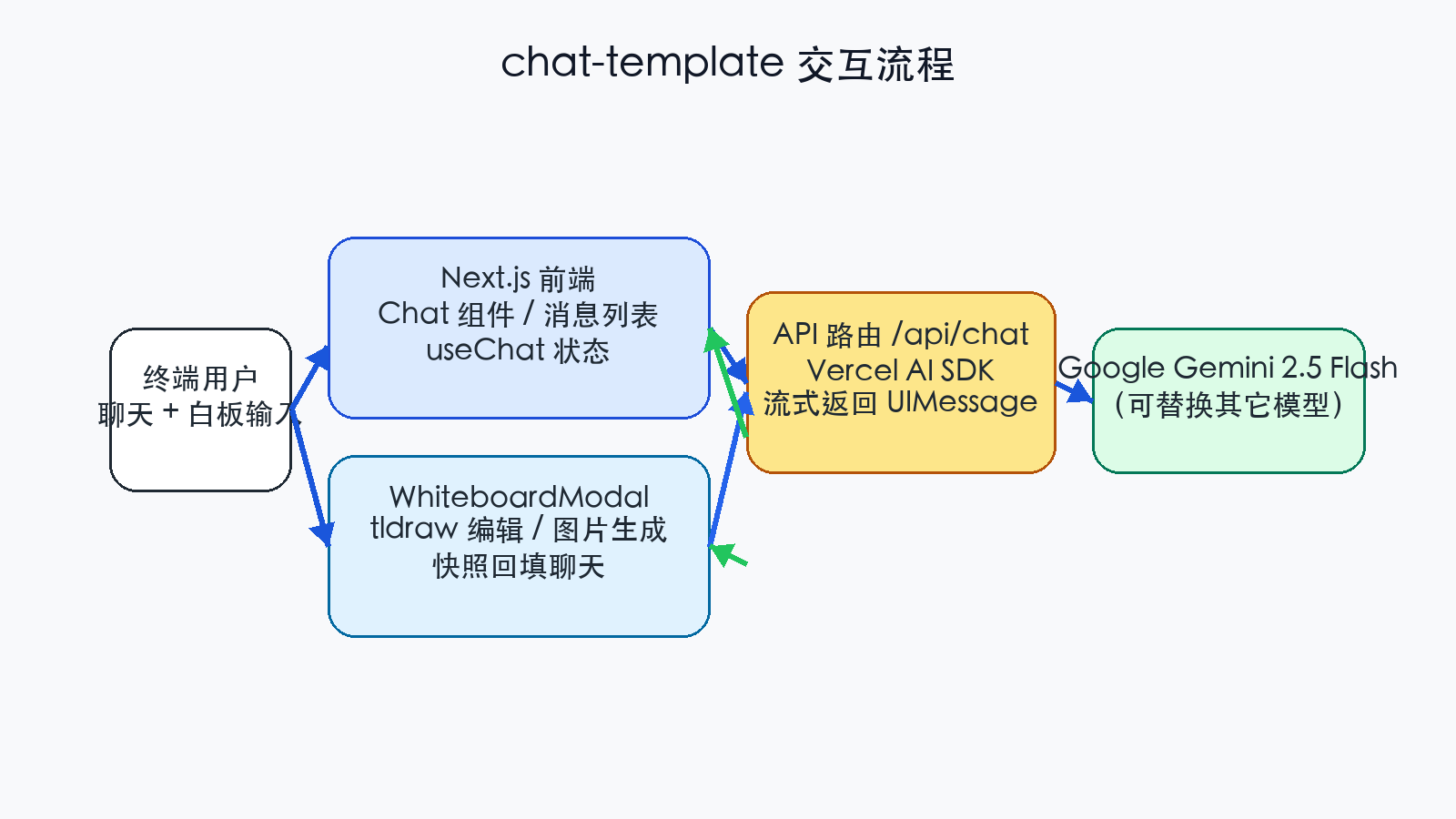
chat-template Interaction Flow
4.1 Project Overview
Positioning: Next.js template providing a standard chat interface with an embedded whiteboard modal for sketching and backfilling into the chat stream.
Tech Stack: Next.js (App Router) + Vercel AI SDK + tldraw; uses Gemini 2.5 Flash by default.
4.2 Key File Descriptions
- src/components/Chat.tsx: Integrates message list, input box, and whiteboard toggle.
- src/components/WhiteboardModal.tsx: Handles whiteboard editing and snapshot injection.
- src/app/api/chat/route.ts: Calls streamText with a response limit.
5. tldraw-sync-cloudflare —— Production-grade Real-time Sync Backend
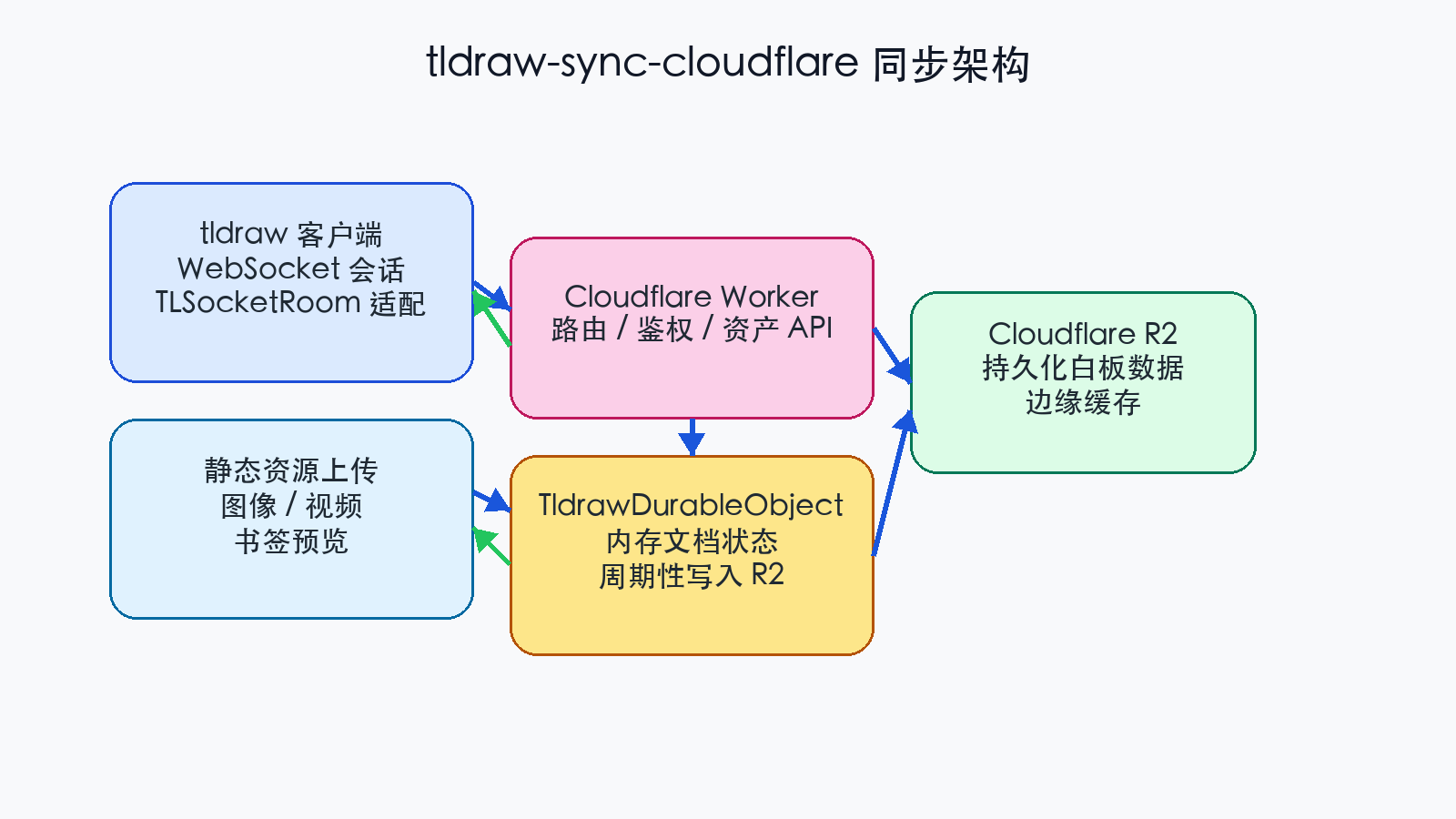
tldraw-sync-cloudflare Sync Architecture
5.1 Project Overview
Positioning: Official production-grade tldraw Sync server implementation using Cloudflare Workers, Durable Objects, and R2 for multi-room collaboration.
Capabilities:
- One Durable Object per room handling WebSocket broadcasts.
- Periodic persistence to R2 with auto-recovery.
- APIs for asset uploads and bookmark unfurling.
6. workflow-template —— Executable Workflow Editor
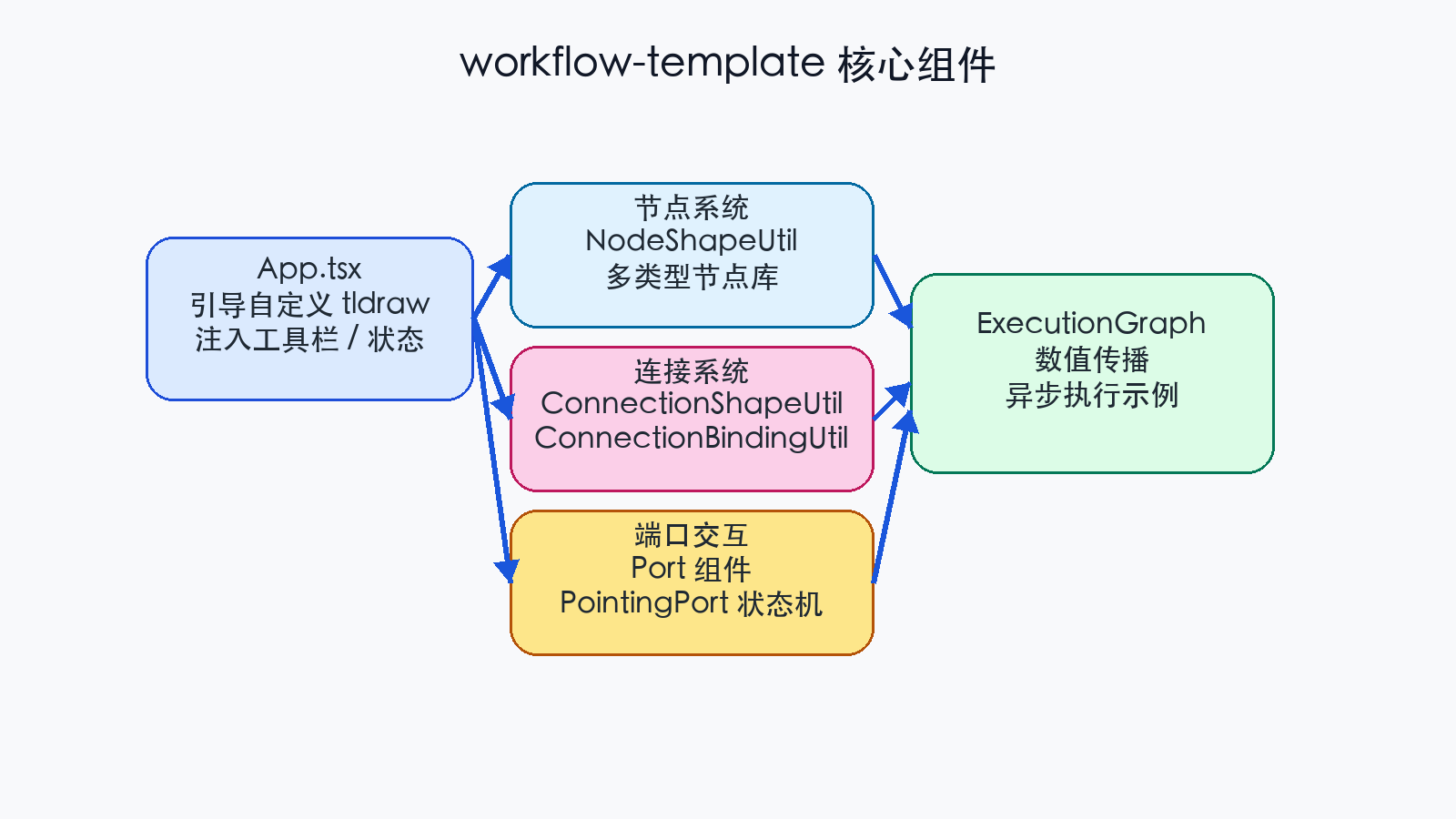
workflow-template Core Components
6.1 Project Overview
Positioning: Pure frontend template demonstrating how to implement an executable "Node-Link-Port" workflow editor on tldraw.
Features:
- Port-driven interaction: Click/drag ports to create nodes or connections.
- Value flow: ExecutionGraph demonstrates real-time calculation and async execution.
7. Documentation and Diagram Notes
This documentation (docs/flow_documentation.md) was manually authored. All diagrams are located in docs/diagrams.
Use scripts/generate_diagrams.py to regenerate PNG charts. The script depends on Pillow and uses STHeiti font for Chinese display.
8. Suggested Future Work
- Unified Dependency Management: Introduce pnpm workspaces.
- Automated Deployment: CI scripts for Cloudflare/Vercel.
- Internationalization: Add i18n modules for multi-language UI.
This white paper and its charts were generated offline. You can convert the Markdown to PDF/Docx using pandoc:
pandoc docs/flow_documentation.md \ --from markdown \ --to docx \ --output docs/flow_documentation.docx \ --resource-path=docs